

Most warehouse operations hit a breaking point when spreadsheets and manual counts can no longer keep up with order volume. A warehouse management system replaces that manual process, controlling daily operations inside a warehouse from the moment goods arrive to the moment they leave. It gives a business one place to track inventory location, picking, packing, and shipping across the whole facility.
How Does an Order Management System Work?
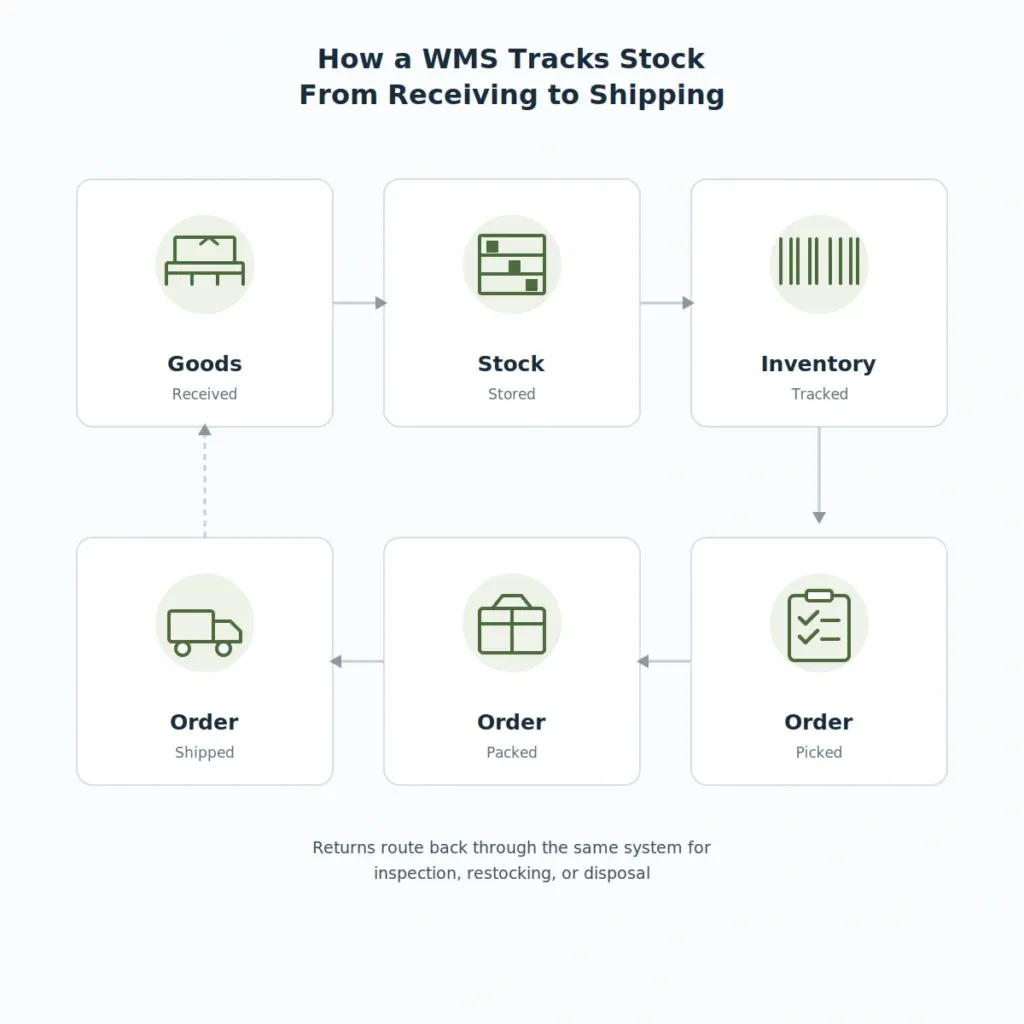
A warehouse management system, or WMS, keeps a live record of where every item sits inside a warehouse and updates that record the moment stock moves. When goods arrive, the WMS logs them in, assigns a storage location, and directs staff to the right spot, usually through a barcode scan or an RFID read.
From there, the system takes over picking, packing, and shipping. It tells staff which items to pull for an order, in what sequence, and confirms each step through a scan before the order moves on. That scan-based confirmation is what separates a WMS from a spreadsheet: nothing gets marked complete until the system has actually verified it happened.
How Is a Warehouse Management System Different From an Order Management System?
A WMS and an order management system sit right next to each other in the fulfillment chain, which is why they get mixed up so often. The clearest way to separate them is by what each is actually responsible for.
- Warehouse management system (WMS): Runs the physical side of a warehouse, including inventory location, picking routes, and staff tasks.
- Order management system (OMS): Manages the customer-facing side of an order, from capture through fulfillment and returns.
- Enterprise resource planning (ERP): Runs the broader business, including finance and procurement, with warehouse data feeding into it.
An OMS decides which warehouse should fulfill an order, then hands that instruction to the WMS, which handles the physical picking and packing. Businesses that already have an order management system usually add a WMS next, once volume moving through the warehouse becomes the bottleneck rather than order flow.
What Types of Warehouse Management Systems Are There?
Most businesses land on one of four types, and the right one depends less on company size than on how far the warehouse operation has outgrown a generic setup. The next real decision is which must-have features actually matter, since picking the wrong type early is a common reason businesses replace a WMS within a couple of years.
- Standalone WMS: A dedicated system focused only on warehouse operations, best suited to a business running one or two warehouses without heavy integration needs.
- Cloud-based WMS: Hosted by the vendor and accessed online, which keeps upfront hardware costs low and deployment fast.
- ERP-based WMS: A warehouse module built into an existing ERP, useful once finance, procurement, and warehouse data genuinely need to stay in one system.
- Supply chain module WMS: Part of a broader supply chain suite that also covers transportation and demand planning, suited to businesses coordinating several warehouses and carriers at once.
A business running a single site with simple fulfillment usually does fine with a standalone or cloud WMS. Once a company runs multiple warehouses, or its finance team keeps re-entering data that already exists in the warehouse system, an ERP-based or supply chain setup tends to earn its cost. This kind of digitization also ties into a broader national push: India’s National Logistics Policy has driven warehousing standardization since 2022, with the country rising to 38th on the World Bank’s Logistics Performance Index.
What Functions Does a Warehouse Management System Perform?
A WMS covers the full physical journey of stock through a facility, and each function hands off cleanly to the next. Skipping or weakening any single step tends to create errors that surface later, usually at shipping, where they’re hardest to trace back.
- Receiving: Logs incoming stock against purchase orders and flags discrepancies on arrival.
- Put-away: Assigns and directs staff to the correct storage location for each item.
- Inventory tracking: Maintains a live record of stock levels and exact locations across the facility.
- Picking: Directs staff through the shortest route to pull items for an order.
- Packing and shipping: Confirms packed contents against the order and generates shipping documentation.
- Returns processing: Routes returned items through inspection, restocking, or disposal.
Barcode scanning is the baseline technology behind most of these functions, since it gives every item a globally unique, machine-readable identifier that a WMS can track through each step. RFID extends this further by removing the need to scan each item individually, though it costs more to install and tends to make sense only once volume justifies it.
Should a Business Build or Buy a Warehouse Management System?
Packaged WMS platforms cover standard warehouse operations well, but they strain once a business runs unusual picking logic, multiple site types, or integrations no off-the-shelf connector supports. This is really a specific case of the broader custom software vs off-the-shelf decision: a custom build costs more upfront but removes the per-user licensing fees and feature gaps that come with fitting a business into someone else’s software.
Table: Buying vs building a warehouse management system
| Factor | Buying a WMS | Building a custom WMS |
|---|---|---|
| Time to launch | Weeks to a few months | Several months to a year |
| Upfront cost | Lower | Higher |
| Ongoing cost | Per-user or per-warehouse licensing fees | Maintenance and hosting only |
| Fit for unusual workflows | Limited to what the vendor supports | Built around the business’s exact process |
| Integration with existing systems | Depends on available connectors | Built to match existing ERP, OMS, and carrier systems exactly |
| Ownership | Vendor controls the roadmap | Business owns the system and its data |
A packaged WMS makes sense for a business running a fairly standard single-site operation on a tight timeline. A custom build starts to make more sense once picking logic, multi-warehouse routing, or compliance needs get specific enough that a generic platform creates more workarounds than it solves.
How Much Does It Cost to Build a Warehouse Management System in India?
Custom WMS development in the United States commonly runs from $100,000 for a focused build to $400,000 or more once multi-warehouse routing and deep ERP integration enter the picture, similar to the cost curve across supply chain software development generally. Indian teams typically deliver that scope at a real saving of 55 to 62 percent, once management time and specification rework are factored in.
Table: Illustrative custom WMS development cost by complexity
| WMS complexity | Typical scope | US cost (USD) | India cost (INR) |
|---|---|---|---|
| Basic | Single-site inventory tracking, barcode-based picking | $100,000-$150,000 | ₹33.4L-₹54.4L |
| Mid-range | Multi-site routing, ERP/OMS integration, returns workflow | $150,000-$280,000 | ₹54.4L-₹1.01Cr |
| Enterprise | RFID integration, multi-warehouse orchestration, carrier system integration | $280,000-$400,000+ | ₹1.01Cr-₹1.45Cr |
The India figures reflect blended team rates for agency-employed developers rather than individual freelancers, and they assume the client comes in with clear requirements upfront. Annual maintenance typically adds another 15 to 20 percent of the initial build cost each year for patches, updates, and small feature changes.
How Does a Warehouse Management System Support GST E-Invoicing in India?
Any warehouse dispatching B2B goods in India needs invoices that flow through the government’s e-invoice system, which validates every invoice and issues a unique reference number before it can be used for GST filing or e-way bill generation. A WMS that triggers invoice generation the moment an order is packed and ready to ship keeps that step from becoming a manual bottleneck at dispatch.
This matters because the invoice reference number generated at this stage feeds straight into e-way bill creation for the shipment. When the WMS, invoicing, and e-way bill process share the same data instead of three separate manual entries, there’s much less room for the mismatches that trigger scrutiny during a GST audit.
- Generates invoice data automatically once an order is confirmed as packed.
- Passes item, batch, and consignment value details straight to the invoicing system.
- Keeps invoice and dispatch records consistent to reduce reconciliation work later.
- Maintains a record of each shipment’s invoice reference number for audit purposes.
What Should a Business Look for Before Choosing a Warehouse Management System?
The right starting point for warehouse management software development isn’t a feature checklist from any single vendor. It’s an honest look at how many warehouses a business runs, how specific its picking logic really is, and how tightly the system needs to connect to the order and finance systems already in place.
When a business’s warehouse operations, integration needs, or compliance requirements go beyond what an off-the-shelf platform handles well, Zethicworks with operations leaders through exactly this kind of evaluation, mapping the real fulfillment process before building a system around it rather than forcing the business to adapt to someone else’s software.