

The one person who still understands the accounting system retires, and suddenly a piece of software nobody has touched in years becomes the building’s most urgent problem. What is a legacy system? It’s rarely the oldest system in the company. It’s the one nobody can safely change anymore, and the one every roadmap quietly routes around instead of through. Every business has at least one. It might be the invoicing tool from a decade ago, the internal database from three acquisitions back, or the workflow engine one engineer built years ago that nobody has opened since. The label has less to do with the calendar than with how much confidence anyone still has in touching the code.
What Is a Legacy System?
A legacy system is a system, application, or piece of infrastructure that is still running critical parts of the business but has become costly, risky, or difficult to maintain relative to modern alternatives. Age alone doesn’t make a system legacy. A 15-year-old system that still gets vendor support, runs on a maintained stack, and scales fine isn’t one.
What qualifies a system for that label is a combination of factors: the vendor has stopped supporting it, the people who understand it are leaving faster than they can be replaced, or the cost of keeping it running is climbing every year with no end in sight. A system can be old and perfectly healthy.
A system can also be five years old and already legacy if it was built on a stack nobody maintains anymore the kind of system Legacy Application Modernization Services exists to fix.
Is Your System Already a Legacy System?
Most businesses don’t have a single dramatic sign. They have a slow accumulation of smaller ones that only look obvious in hindsight.
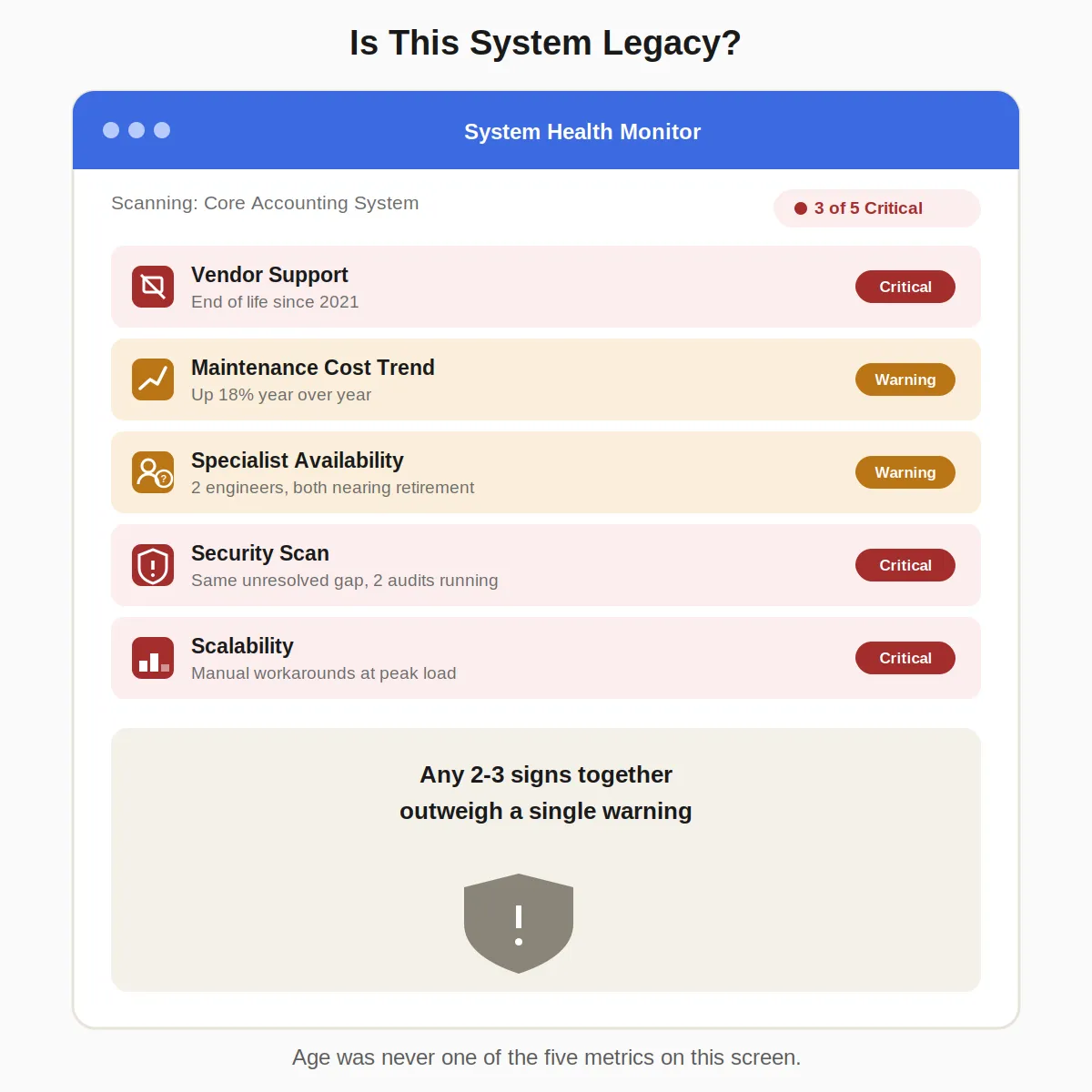
- No vendor support: The software or hardware vendor has discontinued the product, leaving security patches and bug fixes to internal staff or expensive third parties
- Rising maintenance cost: The same class of fix takes longer and costs more each year, without the system doing anything new
- Scarce specialist skills: Finding someone who can safely work in the codebase is getting harder and more expensive
- Known security gaps: A security review keeps flagging the same unresolved vulnerability because fixing it properly would mean touching code nobody wants to touch
- Inability to scale: The system can’t handle current load without workarounds, let alone next year’s growth
Two or three of these showing up at once is a stronger signal than any single one on its own. That same scarcity is what makes in-house vs outsourced AI development such a live question for many teams, since finding the right people is a real constraint either way.
What Problems Do Legacy Systems Cause?
The problems compound rather than stay isolated. A security gap left unpatched because the fix is risky becomes a compliance finding, and a compliance finding becomes an audit failure.
An audit failure becomes a board-level conversation that started as a minor technical debt item.
Security is the sharpest version of this. Outdated, unsupported software is a constant presence among the vulnerabilities attackers actively exploit, which is why unpatched legacy systems show up so often in real breach reports rather than staying a theoretical risk.
Beyond security, legacy systems commonly cause integration failures with newer tools, slower feature delivery because every change requires extra caution, and a shrinking pool of people willing to maintain them. Untangling which problem is driving the others is the kind of diagnostic work a custom software development company does before recommending any fix.
What Does Keeping a Legacy System Cost You?
The real shock usually isn’t the replacement quote. It’s realizing what the business has already spent keeping the old system alive, spread across enough line items that nobody added it up until now.
| What You’re Paying For | Cost (USD) | Cost (India, ₹) |
|---|---|---|
| Annual maintenance, single legacy application | $40,000-$800,000+ per year, depending on complexity | ₹10 lakh-₹50 lakh+ per year |
| One-time replacement or modernization | $30,000-$2,300,000+, depending on scope | ₹2 lakh-₹1 crore+, depending on scope |
Legacy maintenance commonly consumes 60-80% of an organization’s total IT budget, according to industry research from Gartner, Forrester, and Deloitte. Once maintenance is eating that share of the budget, the annual cost of keeping a system running can exceed a one-time replacement within just a few years, even though the replacement number looks scarier upfront.
The comparison rarely gets made this way in practice, since maintenance costs are scattered across payroll, infrastructure, and vendor contracts, while a replacement shows up as one large line item. That framing makes the smaller, recurring cost look safer than it is. The same blind spot applies to what non-compliance costs a bank: the visible price tag is never the real one.
Should You Replace, Retain, or Retire a Legacy System?
Replacement isn’t the only legitimate answer, and treating it as the default is how modernization budgets get spent on systems that didn’t need the investment.
- Retain:A core banking operations platform may still do its job reliably, with manageable operating costs and no significant security or compliance risk. Leave it alone and revisit later.
- Replace: The system is business-critical but costly, risky, or blocking growth. This is where a rehost, refactor, or full rebuild earns its cost
- Retire: The system no longer serves a real business purpose. Turning it off removes the maintenance burden and the security risk in one move, and it’s the option most often overlooked
Sorting systems into these three categories before spending anything is what keeps a modernization budget pointed at the systems that need it, with IT governance software helping teams structure and document those decisions. The same discipline applies when choosing between custom software vs off-the-shelf: naming the real options matters more than picking a favorite by default.
What Happens If You Delay Replacing a Legacy System?
Delay doesn’t freeze the problem in place; it compounds it. The U.S. Government Accountability Office identified 10 critical federal legacy systems most in need of modernization back in 2019. By 2025, six years later, agencies had completed only three of them, and the GAO’s own 2025 report found that 8 of the newly reviewed 11 highest-risk systems still ran on outdated languages and 7 had known cybersecurity vulnerabilities.
That pattern isn’t unique to government. A system that’s expensive to replace today is rarely cheaper to replace in three years, since the specialists who understand it keep leaving, the security gaps keep accumulating, and the business keeps building more dependencies on top of a foundation that isn’t getting any newer.
Businesses that wait for a forcing event, such as a breach, an outage, or a vendor shutting down support entirely, end up making the replacement decision under pressure, with far less room to choose the right strategy than they would have had a year earlier.
How Should Your Business Decide What to Do With a Legacy System?
There’s no universal answer to what is a legacy system that fits every situation, because the label covers systems in wildly different conditions. The useful question isn’t how old a system is. It’s whether it’s still cheap and safe to keep, or quietly becoming the most expensive thing the business owns.
Zethic works with founders and CTOs to answer that question honestly, assessing which systems need to be replaced, which are safe to retain, and which should be retired outright, then builds the resulting plan around what each system needs rather than treating every legacy system the same way.