


As a development team takes on more projects, deployment practices tend to diverge from one project to the next. This increases operational risk and slows onboarding. Coolify deployment is now the standard process across close to 200 of our services, and every project follows the same steps from code to release.
What Is Coolify and What Does It Do?
Coolify is an open-source platform for deploying and managing applications on servers that an organisation owns or rents. It operates as a management layer on top of Docker, so each application runs as a container, and every project follows a common process. Two terms are worth distinguishing. Hosting keeps an application available on a server, and deploying releases a new version of it. Coolify supports both: it deploys each release and then manages the running application. Its core capabilities include:
- Git-based deployments: Connect a repository and deploy from a selected branch
- Docker at the core: Run applications from a Dockerfile, a Docker Compose file or a ready-made image
- Automatic SSL: Free certificates that renew without manual effort
- Databases and backups: One-click databases with scheduled backups
- Team roles: Members can view and change only what their role permits
- Ready-made services: A catalogue of popular open-source tools that install in a few clicks
Why Did We Move from Ploi to Coolify?
We previously used Ploi for server management, and it met our needs while the portfolio was smaller. As the number of projects increased, consistency across them became the priority. Four requirements shaped the decision:
- One standard deployment process: Each project had its own deployment steps, so the method depended on who had worked on it
- Less direct server access: Developers often needed to log in to servers to deploy or resolve an issue
- A clearer record of changes: With direct access, it was harder to see who had changed what on a server
- Less repeated setup: Even an automated workflow had to be created again for every project
For example, Node.js and PHP projects followed different deployment routes. This is manageable for a small portfolio, but it adds coordination effort as the portfolio expands. We also favour open-source tools, in keeping with our own mock API server, which we published as open source.
What Changed After We Adopted Coolify?
The most significant change is that all deployments are now Docker-based. Docker packages an application together with its dependencies, so a project behaves consistently across development and production environments. This is now the standard for every project.
| Area | Earlier setup | With Coolify |
|---|---|---|
| Deployment process | Steps varied by project | One standard Docker process |
| Process knowledge | Held by the person who worked on the project | Shared through the same guidelines for every project |
| Server access | Developers often logged in directly | Developers deploy without server access |
| Starting a deployment | Manual steps on the server | Automatic when code is pushed to a branch |
| Change history | No clear record of server changes | Changes arrive through the repository and Coolify |
How Does a Coolify Deployment Work for a Project?
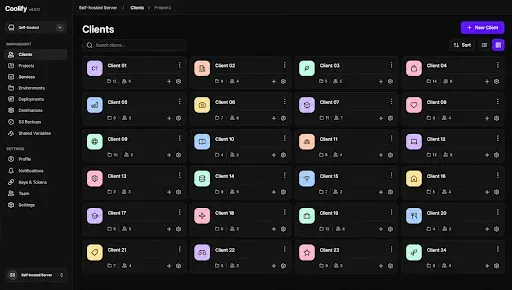
Each project follows the same sequence:
- The team adds a Dockerfile to the project repository, or a Docker Compose file when the project runs several services together. The Dockerfile describes how to build and run the application, and the Compose file describes how the containers work together.
- The project is connected to Coolify, with the target server and branch selected.
- A developer pushes code to that branch.
- Coolify builds the Docker image and deploys it automatically.
- The team monitors progress and logs in Coolify.
Because the configuration is stored in the repository, a new team member can read it and understand how the project is deployed. Developers concentrate on code, while Coolify handles the build and release steps.
How Do We Run It at Our Scale?
We currently manage around 8 servers, which run roughly 180 to 200 services through Coolify. These include production websites and applications for our clients on servers we manage, together with development applications that are tested before release. At this scale, a standard process supports predictability. When every service is deployed in the same way, routine releases require less coordination. The same applies to organisations that divide an application into microservices, where many small services benefit from a common routine.
How Does Coolify Keep Deployments Under Control?
Coolify provides control over deployments without slowing delivery:
- Each release runs through the same build and release steps, so results are predictable
- Deployment logs in Coolify give the team a record of every release
- Changes arrive through the repository, so the history shows what was deployed and by whom
- Team roles limit who can view and change each project
Limiting direct server access reduces the risk of unintended changes and protects production environments.
What Helps Teams Adopt Coolify Smoothly?
The following practices support a smooth transition:
- Create one Dockerfile template per technology, such as Node.js or PHP, so that every project starts from the same base
- Document the push-to-deploy flow once, as a CI/CD pipeline that every project follows
- Begin with a development server and move production services once the process is established
- Add a health check to each application so that Coolify can confirm a release has started correctly
- Store passwords and keys in Coolify’s environment settings, outside the repository
- Allow time to move older projects into Docker containers before deploying them with Coolify
- Size servers for the workload, since builds need additional capacity beyond the applications themselves
For a first server, Coolify’s documentation lists a minimum of 2 CPU cores, 2 GB of RAM and 10 GB of free storage, with Docker and SSH access to the server. Docker images, volumes and backups need additional storage, so organisations running several applications usually need more.
What Does Each Role Gain?
As a software development company, we see the benefit of a standard process across several roles:
| Role | What they gain |
|---|---|
| Developers | Push to a branch and monitor the deployment, with no server login needed |
| Engineering leads | One standard process across every project, which simplifies reviews and handovers |
| Clients | A consistent, documented way in which their applications are deployed and managed |
How Can Your Team Apply the Same Approach?
We adopted Coolify to address a requirement within our own engineering team. The same principle guides our client engagements: identify the process that depends on individual knowledge and convert it into a standard that any team member can follow. Coolify is open source, so organisations can begin on their own servers and adapt the platform to their needs. Our engineering services support this kind of work:
- Custom application development that is ready for Docker-based deployment
- CI/CD pipeline setup so that releases move from code to production in a repeatable way
- Server and deployment planning for teams managing many applications
Plan Standard Deployments for Your Team
At Zethic, we use Coolify to turn deployment into a repeatable routine that any member of the team can follow. Teams that manage several servers can follow the same approach. Our engineering team can review a current setup and suggest a practical path to a standard process. We recommend starting with one development server and a single project, so the team can confirm the process before production services move. The remaining projects can then follow the same routine in stages.